Engine#
Engine class#
An Engine implements a simple interface to run and control a realtime
csound process.
For offline processing, see OfflineEngine
Example
from csoundengine import Engine

# create an engine with default options for the platform
engine = Engine()

# Compile an instrument
engine.compile(r'''
  instr synth
    ; assign preset values for parameters
    ;    p1 p2 p3 p4  p5 p6
    pset 0, 0, 0, 60, 1, 4000   ; the first three values (p1, p2, p3) are not considered
    kmidinote = p4
    kamp = p5
    kcutoff = p6
    kfreq = mtof:k(kmidinote)
    asig = vco2:a(kamp, kfreq)
    asig = moogladder2(asig, kcutoff, 0.9)
    asig *= linsegr:a(0, 0.1, 1, 0.1, 0)
    outs asig, asig
  endin
''')

# start an event with indefinite duration. This returns a unique (fractional)
# instance number, which can be used to control its parameters
# The `args` parameter expects any arguments starting with p4
p1 = engine.sched("synth", args=[67, 0.1, 3000], unique=True)

# any parameter with k-rate can be modified while running:
# change midinote
engine.setp(p1, 4, 67)

# modify cutoff
engine.setp(p1, 6, 1000, delay=4)

# stop the synth:
engine.unsched(p1)

# Parameters can also be set using their assigned names. Defaults
# can be set via the pset opcode. In this case the cutoff parameter
# will be assigned the default 4000
p1 = engine.sched("synth", kmidinote=60, kamp=0.1)

# Change the pitch
engine.setp(p1, 'kmidinote', 62, delay=2)
See also Session for a higher level interface:
from csoundengine import *
session = Engine().session()
session.defInstr('mysynth', r'''
    |kmidinote=60, kamp=0.1, kcutoff=3000|
    kfreq = mtof:k(kmidinote)
    asig = vco2:a(kamp, kfreq)
    asig = moogladder2(asig, kcutoff, 0.9)
    aenv = linsegr:a(0, 0.1, 1, 0.1, 0)
    asig *= aenv
    outs asig, asig
''')
# Session sched returns a Synth object
synth = session.sched('mysynth', kmidinote=67, kcutoff=2000)

# Change the midinote after 2 seconds
synth.setp(kmidinote=60, delay=2)
Instrument Numbers#
An Engine defines internal instruments to perform some of its
tasks (reading tables, sample playback, etc). To avoid clashes between these
internal instruments and user instruments, there are some reserved instrument
numbers: all instrument numbers from 1 to 99 are reserved for internal use, so
the first available instrument number is 100.
Configuration#
Defaults for Engine / Session can be
customized via:
from csoundengine import *
config.edit()
Hint
For more information, see Configuration
Interactive Use#
csoundengine is optimized to be used interactively and particularly within Jupyter. See Csoundengine inside Jupyter
IPython Magic#
csoundengine also defines a set of ipython/jupyter magics

Classes:
|
Implements a simple interface to run and control a realtime csound process. |
Functions:
|
Get an already created engine by name |
Returns the names of the active engines |
- class csoundengine.engine.Engine(name='', sr=0, ksmps=None, backend='default', outdev=None, indev=None, a4=0, nchnls=None, nchnls_i=None, realtime=False, buffersize=None, numbuffers=None, globalcode='', numAudioBuses=None, numControlBuses=None, quiet=None, udpserver=None, udpport=0, commandlineOptions=None, includes=None, midibackend='default', midiin=None, autosync=False, latency=None, sampleAccurate=False, numthreads=0, useProcessQueue=False)[source]#
Implements a simple interface to run and control a realtime csound process.
For offline rendering, see
OfflineSessionandOfflineEngine- Parameters:
name (
str) – the name of the enginesr – sample rate. If not given, the sr of the backend will be used, if possible
ksmps (
int|None) – samples per k-cyclebackend (
str) – passed to -+rtaudio (“?” to select interactively). If not given, the most appropriate backend will be used.outdev (
str|None) – the audio output device, passed to -o (“?” to select interactively). Leave unset to use the defaultindev (
str|None) – the audio input device, passed to -i (“?” to select interactively). Leave unset to use the defaulta4 (
int) – freq of a4nchnls (
int|None) – number of output channels (passed to nchnls). Leave unset to use the number of channels defined by the backend (if known)nchnls_i (
int|None) – number of input channels. Similar to nchnls. If not given it will either fallback to the number of input channels provided by the backend, or to nchnlsbuffersize (
int|None) – samples per buffer, corresponds to csound’s -b optionnumbuffers (
int|None) – the number of buffers to fill. Together with the buffersize determines the latency of csound and any communication between csound and the python hostglobalcode (
str) – code to evaluate as instr0 (global variables, etc.)includes (
list[str] |None) – a list of files to include. Can be added later viaEngine.includeFile()numAudioBuses (
int|None) – number of audio buses (see Bus Opcodes)numControlBuses (
int|None) – number of control buses (see Bus Opcodes)quiet (
bool|None) – if True, suppress output of csound (-m 0)udpserver (
bool|None) – if True, start a udp server for communication (see udpport)udpport (
int) – the udpport to use for real-time messages. 0=autoassign portcommandlineOptions (
list[str] |None) – command line options passed verbatim to the csound process when startedmidiin (
str|None) – if given, use this device as midi input. Can be ‘?’ to select from a list, or ‘all’ to use all devices. None indicates no midi inputlatency (
float|None) – an extra latency added when scheduling events to ensure synchronicity. See alsoEngine.lockClock()andEngine.pushClock()sampleAccurate (
bool) – use sample-accurate schedulinguseProcessQueue – only valid for csound 6. If True, will set the process callback to handle async tasks
Note
Any option with a default value of None has a corresponding slot in the config. Default values can be configured via config.edit(), see Configuration
Example
from csoundengine import *
# create an engine with default options for the platform
engine = Engine()
engine.compile(r'''
  instr synth
    kmidinote = p4
    kamp = p5
    kcutoff = p6
    asig = vco2:a(kamp, mtof:k(kmidinote))
    asig = moogladder2(asig, kcutoff, 0.9)
    asig *= linsegr:a(0, 0.1, 1, 0.1, 0)
    outs asig, asig
  endin
''')

# start a synth with indefinite duration. This returns a unique (fractional)
# instance number
p1 = engine.sched("synth", args=[67, 0.1, 3000])

# any parameter with k-rate can be modified while running
engine.setp(p1, 4, 60)

# modify cutoff
engine.setp(p1, 6, 1000, delay=4)

# stop the synth:
engine.unsched(p1)
Attributes:
Active engines mapped by name (class variable)
Name of this Engine
Name of the backend used (jack, portaudio, etc)
Duration of one performance cycle (ksmps/sr)
Output device used
Long name of the output device
Input device
Long name of the input device
Number of input channels
Global (init) code to execute at the start of the Engine
Extra options passed to csound
All command line options used to start the engine
List of include files
Added latency for better synch
The csound object
If True, call .sync whenever is needed
Buffer size
Number of buffers to fill
Midi backend used
Has this engine already started?
Number of threads to use in performance (corresponds to csound -j N)
Midi input device
UDP port used (0 if no udp port is active)
Csound version as integer (6.18 = 6180)
The size of the processing block in samples.
Methods:
A dict containing reserved instrument number ranges
Returns the range of available instrument numbers
stop()Stop this Engine
start()Start this engine.
restart([wait])Restart this engine.
registerOutvalueCallback(chan, func)Set a callback to be fired when "outvalue" is used in csound
The latency of the communication to the csound process.
Time latency between a scheduled action and its response.
sync([timeout, force, threshold])Block until csound has processed its immediate events
needsSync([threshold])True if ths engine has been modified
compile(code[, block])Send orchestra code to the running csound instance.
evalCode(code)Evaluate code, return the result of the evaluation
tableWrite(tabnum, idx, value[, delay])Write to a specific index of a table
getTableData(idx[, flat])Returns a numpy array pointing to the data of the table.
realElapsedTime([threshold])Reports the elapsed time of the engine, independent of any locking
Returns the elapsed time since start of the engine
lockClock([lock])Lock the elapsed time clock
Returns True if the clock is locked
pushLock([latency])Lock the clock of this engine
popLock()Reverts the action of pushLock, unlocking the clock
lockedClock([latency])Context manager, locks and unlocks the reference time
sched(instr[, delay, dur, args, relative, ...])Schedule an instrument
queryNamedInstr(instrname[, cached, callback])Find the instrument number corresponding to instrument name
print(msg[, delay])Print a message via csound
unsched(p1[, delay, future])Stop a playing event
Remove all playing and future events :rtype:
Nonesession([priorities, maxControlsPerInstr, ...])Return the Session corresponding to this Engine
makeEmptyTable(size[, numchannels, sr, ...])Create an empty table, returns the index of the created table
makeTable(data[, sr, tabnum, block, callback])Create a new table and fill it with data.
tableExists(tabnum)Returns True if a table with the given number exists
setTableMetadata(tabnum, sr[, numchannels, ...])Set metadata for a table holding sound samples.
callLater(delay, callback)Call callback after delay, triggered by csound scheduler
plotTableSpectrogram(tabnum[, fftsize, ...])Plot a spectrogram of the audio data in the given table
plotTable(tabnum[, sr])Plot the content of the table via matplotlib.pyplot
schedSync(instr[, delay, dur, args, timeout])Schedule an instr, wait for a sync message
channelPointer(channel[, kind, mode])Get a pointer to a csound channel
setChannel(channel, value[, method, delay])Set the value of a software channel (threadsafe)
initChannel(channel[, value, kind, mode])Create a channel and set its initial value
getControlChannel(channel)Get the value of a channel
fillTable(tabnum, data)Fill an existing table with data
tableInfo(tabnum[, cache])Retrieve information about the given table
includeFile(include)Add an #include file to this Engine
readSoundfile([path, tabnum, chan, ...])Read a soundfile into a table (via GEN1), returns the table number
soundfontPlay(index, pitch[, amp, delay, ...])Play a note of a previously loaded soundfont
soundfontPreparePreset(sf2path[, preset])Prepare a soundfont's preset to be used
getUniqueInstrInstance(instr)Returns a unique instance number (a float p1) for instr
playSample(tabnum[, delay, chan, speed, ...])Play a sample already loaded into a table.
playSoundFromDisk(path[, delay, dur, chan, ...])Play a soundfile from disk via diskin2
setp(p1, *pairs[, delay])Modify a pfield of an active note
automateTable(tabnum, idx, pairs[, mode, ...])Automate a table slot
automatep(p1, pidx, pairs[, mode, delay, ...])Automate a pfield of a running event
Returns a dict mapping defined strings to their integer id
strGet(index)Get a string previously set via strSet.
freeTable(tableindex[, delay])Free the table with the given index
testAudio([dur, delay, period, mode, ...])Test this engine's output
udpSendOrc(code)Send orchestra code via UDP.
udpSendScoreline(scoreline)Send a score line to csound via udp
udpSetChannel(channel, value)Set a channel via UDP.
writeBus(bus, value[, delay])Set the value of a control bus
automateBus(bus, pairs[, mode, delay, overtake])Automate a control bus
readBus(bus[, default])Read the current value of a control bus
releaseBus(bus[, delay])Release a persistent bus
assignBus([kind, value, persist])Assign one audio/control bus, returns the bus number.
Get debugging nformation about the status of the bus system
eventUI(eventid, **pargs)Modify pfields through an interactive user-interface
- name#
Name of this Engine
- backend#
Name of the backend used (jack, portaudio, etc)
-
onecycle:
float# Duration of one performance cycle (ksmps/sr)
- outdev#
Output device used
- outdevName#
Long name of the output device
- indev#
Input device
- indevName#
Long name of the input device
-
nchnls_i:
int# Number of input channels
-
globalCode:
str# Global (init) code to execute at the start of the Engine
-
extraOptions:
list[str]# Extra options passed to csound
-
commandlineOptions:
list[str]# All command line options used to start the engine
-
includes:
list[str]# List of include files
-
extraLatency:
float# Added latency for better synch
-
csound:
Csound# The csound object
-
autosync:
bool# If True, call .sync whenever is needed
-
bufferSize:
int# Buffer size
-
numBuffers:
int# Number of buffers to fill
-
midiBackend:
None|str# Midi backend used
- started#
Has this engine already started?
-
numthreads:
int# Number of threads to use in performance (corresponds to csound -j N)
-
midiin:
MidiDevice|None# Midi input device
- udpPort#
UDP port used (0 if no udp port is active)
- version#
Csound version as integer (6.18 = 6180)
- reservedInstrRanges()[source]#
A dict containing reserved instrument number ranges
An Engine has some internal instruments for performing tasks like automation, bus support, etc. Moreover, if an Engine has an attached Session, the session will declare a range of instrument numbers as reserved.
This method returns all those reserved ranges in the form of a list of tuples, where each tuple represents a reserved range. Each tuple has the form
(rangename: str, minInstrNumber: int, maxInstrNumber: int), whererangenameis the name of the range,minInstrNumberandmaxInstrNumberrepresent the instr numbers reservedAny instr number outside of this range can be used.
- Return type:
list[tuple[str,int,int]]
- userInstrumentsRange()[source]#
Returns the range of available instrument numbers
Notice that the first instrument numbers are reserved for internal instruments. If this Engine has an attached Session, the session itself will reserve a range of numbers for its events
- Returns:
int, maxinstr: int) defining a range of available instrument numbers for user instruments.
- Return type:
a tuple (mininstr
- property blockSize: int#
The size of the processing block in samples.
csound defines two variables to control its communication with the audio backend, a hardware buffer (-B option) and a software buffer (-b option). With each audio backend these values are interpreted somewhat differently. In general it can be said that ksmps must divide the software buffer (-b) and the software buffer itself must divide the hardware buffer (-B). Common values for these are: ksmps=64, software buffer=256, hardware buffer=512
- start()[source]#
Start this engine.
The call to .start() is performed as part of the init process and only needs to be called explicitely if the engine was previously stopped. If the engine has already been started this method does nothing
- restart(wait=0.0)[source]#
Restart this engine. All defined instrs / tables are removed
- Return type:
None
- registerOutvalueCallback(chan, func)[source]#
Set a callback to be fired when “outvalue” is used in csound
Register a function
func(channelname:str, newvalue: float) -> None, which will be called whenever the given channel is modified via the “outvalue” opcode. Multiple functions per channel can be registered- Parameters:
chan (
str) – the name of a channelfunc (
Callable[[str,float],None]) – a function of the formfunc(chan:str, newvalue: float) -> None
- Return type:
None
- bufferLatency()[source]#
The latency of the communication to the csound process.
bufferLatencySeconds = buffersize * numbuffers / sr
This latency depends on the buffersize and number of buffers.
- Return type:
float
- controlLatency()[source]#
Time latency between a scheduled action and its response.
This is normally
ksmps/sr * 2but the actual latency varies if the engine is being run in realtime (in that case init-pass is done async, which might result in longer latency).- Return type:
float
- sync(timeout=None, force=False, threshold=2.0)[source]#
Block until csound has processed its immediate events
- Parameters:
timeout (
float|None) – a timeout in seconds; None = use default timeout as defined in the configuration (TODO: add link to configuration docs)force – if True, sync even if not needed
threshold – if time since last modification is longuer than this threshold assume that sync is not needed
- Return type:
bool- Returns:
True if it synced, False if no sync was performed
Raises TimeoutError if the sync operation takes too long
Example
>>> from csoundengine import *
>>> e = Engine(...)
>>> tables = [e.makeEmptyTable(size=1000) for _ in range(10)]
>>> e.sync()
>>> # do something with the tables
- needsSync(threshold=1.0)[source]#
True if ths engine has been modified
Actions that modify an engine: code compilation, table allocation, …
- Return type:
bool
- compile(code, block=False)[source]#
Send orchestra code to the running csound instance.
The code sent can be any orchestra code
- Parameters:
code (
str) – the code to compileblock – if True, this method will block until the code has been compiled
- Return type:
None
Raises
CsoundErrorif the compilation failedNote
If this instance has been started with a UDP port and the config option ‘prefer_udp’ is true, the code will be sent via udp. Otherwise the API is used. This might have an impact in the resulting latency of the operation, since using the API when running a performance thread can cause delays under certain circumstances
Example
>>> e = Engine()
>>> e.compile("giMelody[] fillarray 60, 62, 64, 65, 67, 69, 71")
>>> code = open("myopcodes.udo").read()
>>> e.compile(code)
- evalCode(code)[source]#
Evaluate code, return the result of the evaluation
The expression to evaluate must be prefixed by
return- Parameters:
code (str) – the code to evaluate. Usually an expression returning a float value (see example)
- Return type:
float- Returns:
the result of the evaluation
Example
>>> e = Engine()
>>> e.compile(r'''
... instr foo
...   outch 1, oscili(0.1, p4)
... endin''')
>>> e.evalCode('return nstrnum("foo")')
- tableWrite(tabnum, idx, value, delay=0.0)[source]#
Write to a specific index of a table
- Parameters:
tabnum (int) – the table number
idx (int) – the index to modify
value (float) – the new value
delay (float) – delay time in seconds. Use 0 to write synchronously
- Return type:
None
See also
- getTableData(idx, flat=False)[source]#
Returns a numpy array pointing to the data of the table.
Any modifications to this array will modify the table itself.
Note
Multichannel audio is loaded into a csound table as a flat array with samples interleaved.
- Parameters:
idx (
int) – the table indexflat – if True, the data will be returned as a flat (1D) array even if the table holds a multi-channel sample.
- Return type:
ndarray- Returns:
a numpy array pointing to the data array of the table. Raises IndexError if the table was not found
- realElapsedTime(threshold=0.1)[source]#
Reports the elapsed time of the engine, independent of any locking
- Parameters:
threshold – the reporting threshold. If this method is called multiple times during this time interval the engine time is extrapolated from the time reported by python and no call to csound is made
- Return type:
float- Returns:
the time elapsed since start of the engine.
See also
- elapsedTime()[source]#
Returns the elapsed time since start of the engine
This time is used as a reference when scheduling events. Since scheduling itself takes a small but not negligible amount of time, when scheduling a great number of events, these will fall out of sync. For this reason the elapsed time can be used as a reference to schedule events in absolute time. Moreover, the elapsed time stays unmodified as long as the engine’s clock is locked for scheduling (see example)
- Return type:
float
Example
>>> from csoundengine import Engine
>>> import numpy as np
>>> e = Engine()
>>> e.compile(r'''
... instr 100
...   ifreq = p4
...   outch 1, oscili:a(0.1, ifreq) * linseg:a(0, 0.01, 1, 0.1, 0)
... endin
... ''')
>>> now = e.elapsedTime()
>>> for t in np.arange(0, 60, 0.2):
...     e.sched(100, t+now, 0.15, args=[1000], relative=False)
...     e.sched(100, t+now, 0.15, args=[800], relative=False)
>>> # The same result can be achieved by locking the elapsed-time clock:
>>> with e.lockedClock():
...     for t in np.arange(0, 10, 0.2):
...         e.sched(100, t, 0.15, args=[1000])
...         e.sched(100, t, 0.15, args=[800])
- lockClock(lock=True)[source]#
Lock the elapsed time clock
This ensures that events scheduled while the clock is locked will run in sync. For this to work all events scheduled must have some latency (they must run in the future)
Example
>>> from csoundengine import Engine
>>> import numpy as np
>>> e = Engine()
>>> e.compile(r'''
... instr 100
...   ifreq = p4
...   outch 1, oscili:a(0.1, ifreq) * linseg:a(0, 0.01, 1, 0.1, 0)
... endin
... ''')
>>> e.lockClock()
>>> for t in np.arange(0, 10, 0.2):
...     e.sched(100, t, 0.15, args=[1000])
...     e.sched(100, t, 0.15, args=[800])
>>> e.lockClock(False)
See also
- pushLock(latency=None)[source]#
Lock the clock of this engine
Allows for recursive locking, so users do not need to see if what the current state of the lock is
See also
- lockedClock(latency=None)[source]#
Context manager, locks and unlocks the reference time
By locking the reference time it is possible to ensure that events which are supposed to be in sync are scheduled correctly into the future. :rtype:
EngineNote
A shortcut for this is to just use the engine as context manager:
with engine:
    engine.sched(...)
    engine.sched(...)
    engine.session().sched(...)
    ...
Example
>>> from csoundengine import Engine
>>> import numpy as np
>>> e = Engine()
>>> e.compile(r'''
... instr 100
...   ifreq = p4
...   outch 1, oscili:a(0.1, ifreq) * linseg:a(0, 0.01, 1, 0.1, 0)
... endin
... ''')
>>> with e.lockedClock():
...     for t in np.arange(0, 10, 0.2):
...         e.sched(100, t, 0.15, args=[1000])
...         e.sched(100, t, 0.15, args=[800])
- sched(instr, delay=0.0, dur=-1.0, *pfields, args=None, relative=True, unique=False, **namedpfields)[source]#
Schedule an instrument
- Parameters:
instr (
int|float|str) – the instrument number/name. If it is a fractional number, that value will be used as the instance number. An integer or a string will result in a unique instance assigned by csound if unique is True. Named instruments with a fractional number can also be scheduled (for example, for an instrument named “myinstr” you canuse “myinstr.001”)delay – time to wait before instrument is started. If relative is False, this represents the time since start of the engine (see examples)
dur – duration of the event
args (
Union[ndarray,Sequence[float|str],None]) – any other args expected by the instrument, starting with p4 (as a list of floats/strings, or a numpy array). Any string arguments will be converted to a string index via strSet. These can be retrieved in csound via strgetrelative – if True, delay is relative to the scheduling time, otherwise it is relative to the start time of the engine. To get an absolute time since start of the engine, call engine.elapsedTime()
unique – if True, assign a unique p1
namedpfields – pfields can be given as keyword arguments of the form p4=…, p6=… Defaults are filled with values defined via
pset
- Return type:
float- Returns:
a fractional p1 of the instr started, which identifies this event. If instr is a fractional named instr, like “synth.01”, then this same instr is returned as eventid (as a string).
Example
from csoundengine import *
e = Engine()
e.compile(r'''
  instr 100
    kfreq = p4
    kcutoff = p5
    Smode strget p6
    asig vco2 0.1, kfreq
    if strcmp(Smode, "lowpass") == 0 then
      asig moogladder2 asig, kcutoff, 0.95
    else
      asig K35_hpf asig, kcutoff, 9.0
    endif
    outch 1, asig
  endin
''')
eventid = e.sched(100, 2, args=[200, 400, "lowpass"])
# simple automation in python
for cutoff in range(400, 3000, 10):
    e.setp(eventid, 5, cutoff)
    time.sleep(0.01)
e.unsched(eventid)
#
# To ensure simultaneity between events:
now = e.elapsedTime()
for t in np.arange(2, 4, 0.2):
    e.sched(100, t+now, 0.2, relative=False)
See also
- queryNamedInstr(instrname, cached=True, callback=None)[source]#
Find the instrument number corresponding to instrument name
- Parameters:
instrname (
str) – the name of the instrumentcached – if True, results are cached
callback – if given, the operation is async and the callback will be called when the result is available. Callback is of the form
func(instrname: str, instrnum: int) -> None. If no callback is given this method blocks until the instrument number is returned
- Return type:
int- Returns:
the instr number if called without callback, 0 otherwise. If the instrument was not found (either because it was never compiled or the compilation is not ready yet) -1 will be returned
- print(msg, delay=0.0)[source]#
Print a message via csound
- Parameters:
msg (
str) – the message to printdelay – when to print it
- Return type:
None
- unsched(p1, delay=0, future=False)[source]#
Stop a playing event
If p1 is a round number, all events with the given number are unscheduled. Otherwise only an exact matching event is unscheduled, if it exists
- Parameters:
p1 (
float|str) – the instrument number/name to stopdelay (
float) – if 0, remove the instance as soon as possiblefuture – if True, unsched an event in the future
- Return type:
None
Example
>>> from csoundengine import *
>>> e = Engine(...)
>>> e.compile(r'''
... instr sine
...   a0 oscili 0.1, 1000
...   outch 1, a0
... endin
... ''')
>>> # sched an event with indefinite duration
>>> eventid = e.sched(10, 0, -1)
>>> e.unsched(eventid, 10)
See also
- unschedAll()[source]#
Remove all playing and future events :rtype:
NoneSee also
unsched(),unschedFuture()
- session(priorities=None, maxControlsPerInstr=None, numControlSlots=None)[source]#
Return the Session corresponding to this Engine
Since each Engine can have only one associated Session, the parameters passed are only valid for the creation of the Session. Any subsequent call to this method returns the already created Session, and the arguments passed are not taken into consideration.
- Parameters:
priorities (
int|None) – the max. number of priorities for scheduled instrsnumControlSlots (
int|None) – the total number of slots allocated for dynamic args. The default is determined by the config ‘dynamic_args_num_slots’maxControlsPerInstr (
int|None) – the max. number of dynamic args per instr (the default is set in the config ‘max_dynamic_args_per_instr’)
- Return type:
- Returns:
the corresponding Session
Example
>>> from csoundengine import *
>>> session = Engine().session()
>>> session.defInstr("synth", r'''
... kamp  = p5    ; notice that p4 is reserved
... kmidi = p6
... asig vco2 kamp, mtof:k(kmidi)
... chnmix asig, "mix1"
... ''')
>>> session.defInstr("post", r'''
... a1 chnget "mix1"
... a2 chnget "mix2"
... aL, aR reverbsc a1, a2, 0.85, 12000, sr, 0.5, 1
... outch 1, aL, 2, aR
... chnclear "mix1", "mix2"
... ''')
>>> session.sched("post", priority=2)
>>> for i, midi in enumerate([60, 64, 67]):
...     session.sched("synth", delay=i, dur=4, kamp=0.1, kmidi=midi)
- makeEmptyTable(size, numchannels=1, sr=0, delay=0.0, block=False)[source]#
Create an empty table, returns the index of the created table
- Parameters:
size – the size of the table
numchannels – if the table will be used to hold audio, the number of channels of the audio
sr – the samplerate of the audio, if the table is used to hold audio
delay – when to create the table
- Return type:
int
Example
Use a table as an array of buses
>>> from csoundengine import *
>>> engine = Engine()
>>> source = engine.makeEmptyTable(128)
>>> engine.compile(r'''
... instr 100
...   imidi = p4
...   iamptab = p5
...   islot = p6
...   kamp table islot, iamptab
...   asig = oscili:a(interp(kamp), mtof(imidi))
...   outch 1, asig
... endin
... ''')
>>> tabarray = engine.getTableData(source)
>>> tabarray[0] = 0.5
>>> eventid = engine.sched(100, args=[67, source, 0])
See also
- makeTable(data, sr=0, tabnum=-1, block=True, callback=None)[source]#
Create a new table and fill it with data.
- Parameters:
data (
Union[Sequence[float],ndarray]) – the data used to fill the tabletabnum (
int) – the table number. If -1, a number is assigned by the engine.block – wait until the table is actually created
callback – call this function when ready - f(token, tablenumber) -> None
sr (
int) – only needed if filling sample data. If given, it is used to fill the table metadata in csound, as if this table had been read via gen01
- Return type:
int- Returns:
the index of the new table, if wait is True
Example
from csoundengine import *
e = Engine()
import sndfileio
sample, sr = sndfileio.sndread("stereo.wav")
# modify the sample in python
sample *= 0.5
source = e.makeTable(sample, sr=sr, block=True)
e.playSample(source)
See also
- setTableMetadata(tabnum, sr, numchannels=1, delay=0.0)[source]#
Set metadata for a table holding sound samples.
When csound reads a soundfile into a table, it stores some additional data, like samplerate and number of channels. A table created by other means and then filled with samples normally does not have this information. In most of the times this is ok, but there are some opcodes which need this information (loscil, for example). This method allows to set this information for such tables.
- Parameters:
tabnum (
int) – the table numbersr (
int) – the sample ratenumchannels – number of channels of data
check – if True, it will check if the table exists in the case where the table was not created via the engine
delay – when to perform the operation. This is useful if setting the metadata for a table not created yet
- Return type:
None
- callLater(delay, callback)[source]#
Call callback after delay, triggered by csound scheduler
- Parameters:
delay (
float) – the delay time, in secondscallback (
Callable) – the callback, a function of the sort() -> None
- Return type:
None
The callback will be called after the given delay, plus some jitter (~ 2/3 k-cycles after, never before)
Example
>>> from csoundengine import *
>>> import time
>>> e = Engine()
>>> start = time.time()
>>> e.callLater(2, lambda:print(f"Elapsed time: {time.time() - start:.4f}"))
2.0018
- plotTableSpectrogram(tabnum, fftsize=2048, mindb=-90, maxfreq=None, overlap=4, minfreq=0, sr=44100, chan=0)[source]#
Plot a spectrogram of the audio data in the given table
Requires that the samplerate is set, either because it was read via gen01 (or using .readSoundfile), or it was manually set via setTableMetadata
- Parameters:
source – the table to plot
fftsize (int) – the size of the fft
mindb (int) – the min. dB to plot
maxfreq (int) – the max. frequency to plot
overlap (int) – the number of overlaps per window
minfreq (int) – the min. frequency to plot
sr (
int) – the fallback samplerate, used when the table has no samplerate information of its ownchan – which channel to plot if the table is multichannel
- Return type:
None
Example
>>> from csoundengine import *
>>> e = Engine()
>>> source = e.readSoundfile("mono.wav", block=True)
>>> e.plotTableSpectrogram(source)

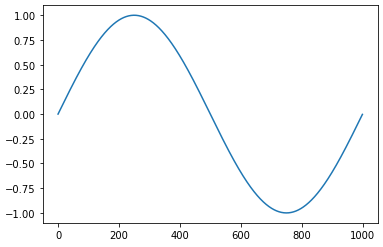
- plotTable(tabnum, sr=0)[source]#
Plot the content of the table via matplotlib.pyplot
If the sr is known the table is plotted as a waveform, with time as the x-coord. Otherwise the table’s raw data is plotted, with the index as x the x-coord. The samplerate will be known if the table was created via
Engine.readSoundfile()or read via GEN1. The sr can also be passed explicitely as a parameter.- Parameters:
tabnum (
int) – the table to plotsr (
int) – the samplerate of the data. Needed to plot as a waveform if the table was not loaded via GEN1 (or viaEngine.readSoundfile()).axes – if given, the plot is done to this axes
- Return type:
Figure
from csoundengine import *
e = Engine()
source = e.readSoundfile("mono.wav", block=True)
# no sr needed here since the output was rea via readSoundfile
e.plotTable(source)

import matplotlib.pyplot as plt
import sndfileio
fig, ax = plt.subplots()
data, sr = sndfileio.sndread("stereo.wav")
tabnum2 = e.makeTable(data, sr=sr)
e.plotTable(tabnum2, axes=ax)

e = Engine()
xs = np.linspace(0, 6.28, 1000)
ys = np.sin(xs)
source = e.makeEmptyTable(len(ys))
e.fillTable(source, data=ys)
e.plotTable(source)
See also
- schedSync(instr, delay=0, dur=-1, args=None, timeout=-1)[source]#
Schedule an instr, wait for a sync message
Similar to
sched()but waits until the instrument sends a sync message. The instrument should expect a sync token at p4 (see example) and send an answer via ‘sendsync’ (sendsync itoken, ivalue=0)Note
args should start with p5 since the sync token is sent as p4
- Parameters:
instr (
int|float|str) – the instrument number/name. If it is a fractional number, that value will be used as the instance number.delay (
float) – time to wait before instrument is starteddur (
float) – duration of the eventargs (
Union[ndarray,Sequence[float|str],None]) – any other args expected by the instrument, starting with p5 (as a list of floats/strings, or as a numpy float array). Any string arguments will be converted to a string index via strSet. These can be retrieved via strget in the csound instrumenttimeout – if a non-negative number is given, this function will block at most this time and then raise a TimeoutError
- Return type:
tuple[float,float|None]- Returns:
the fractional p1 of the scheduled note, the sync return value (see example) or None if the instrument does not return any value. Raises TimeoutError if the operation times out
Example
>>> from csoundengine import *
>>> e = Engine()
>>> e.compile(r'''
... instr readsound
...   itoken = p4
...   Spath strget p5
...   itab ftgen ftgen 0, 0, 0, -1, Spath, 0, 0, 0
...   sendsync(itoken, itab)
...   turnoff
... endin
... ''')
>>> eventid, tabnum = e.schedSync('readsound', args=['/path/to/sound.wav'])
- channelPointer(channel, kind='control', mode='rw')[source]#
Get a pointer to a csound channel
- Parameters:
channel (
str) – the name of the channelkind – one of ‘control’ or ‘audio’
mode – one of ‘r’ (input), ‘w’ (output), ‘rw’ (input/output)
- Return type:
ndarray- Returns:
the pointer to the data as a numpy array
- setChannel(channel, value, method='', delay=0.0)[source]#
Set the value of a software channel (threadsafe)
- Parameters:
channel (
str) – the name of the channelvalue (
float|str|ndarray) – the new value, should match the type of the channel (a float for a control channel, a string for a string channel or a numpy array for an audio channel)method – one of
'api','score','udp'. An empty str will choose the most appropriate method for the current engine/argsdelay – a delay to set the channel
- Return type:
None
Example
>>> from csoundengine import *
>>> e = Engine()
>>> e.initChannel("mastergain", 1.0)
>>> e.compile(r'''
... instr 100
...   asig oscili 0.1, 1000
...   kmastergain = chnget:k("mastergain")
...   asig *= intrp(kmastergain)
... endin
... ''')
>>> eventid = e.sched(100)
>>> e.setChannel("mastergain", 0.5)
- initChannel(channel, value=0, kind='', mode='r')[source]#
Create a channel and set its initial value
- Parameters:
channel (
str) – the name of the channelvalue (
float|str|ndarray) – the initial value of the channel, will also determine the type (k, a, S)kind – One of ‘k’, ‘S’, ‘a’. Use None to auto determine the channel type.
mode – r for read, w for write, rw for both.
- Return type:
None
Note
the mode is set from the perspective of csound. A read (input) channel is a channel which can be written to by the api and read from csound. An write channel (output) can be written by csound and read from the api
Example
>>> from csoundengine import *
>>> e = Engine()
>>> e.initChannel("mastergain", 1.0)
>>> e.compile(r'''
... instr 100
...   asig oscili 0.1, 1000
...   kmastergain = chnget:k("mastergain")
...   asig *= intrp(kmastergain)
... endin
... ''')
>>> eventid = e.sched(100)
>>> e.setChannel("mastergain", 0.5)
- getControlChannel(channel)[source]#
Get the value of a channel
- Parameters:
channel (
str) – the name of the channel- Return type:
float- Returns:
the value of the channel. Raises KeyError if the channel does not exist.
Example
>>> from csoundengine import *
>>> e = Engine()
>>> e.initChannel("freq", mode="w")
>>> e.compile('''
... instr pitchtrack
...   asig inch 1
...   afreq, alock plltrack asig, 0.25, 20, 0.33, 50, 800
...   kfreq = k(afreq)
...   chnset kfreq, "freq"
... endin
... ''')
>>> eventid = e.sched("pitchtrack")
>>> while True:
...     freq = e.getControlChannel("freq")
...     print(f"freq: {freq:.1f}")
...     time.sleep(0.1)
- fillTable(tabnum, data)[source]#
Fill an existing table with data
This is a blocking operation
- Parameters:
tabnum (
int) – the table numberdata (
Union[Sequence[float],ndarray]) – the data to put into the tableblock – if True, block while performing the operation
- Return type:
None
Example
>>> from csoundengine import *
>>> import numpy as np
>>> e = Engine()
>>> xs = np.linspace(0, 6.28, 1000)
>>> ys = np.sin(xs)
>>> source = e.makeEmptyTable(len(ys))
>>> e.fillTable(source, data=ys)
>>> e.plotTable(source)
See also
- tableInfo(tabnum, cache=True)[source]#
Retrieve information about the given table
- Parameters:
tabnum (
int) – the table numbercache – if True, query the cache to see if info for this table has already been requested
- Return type:
TableInfo|None- Returns:
a TableInfo with fields tableNumber, sr (
ftsr), numChannels (ftchnls), numFrames (nsamps), size (ftlen). Returns None if the table was not found
Note
Some information, like sr, is only available for tables allocated via
GEN01(for example, usingreadSoundfile()). This data can also be set explicitely viasetTableMetadata()Example
>>> from csoundengine import *
>>> e = Engine()
>>> source = e.readSoundfile("stereo.wav", block=True)
>>> e.tableInfo(source)
TableInfo(tableNumber=200, sr=44100.0, numChannels=2, numFrames=88200, size=176401)
See also
- includeFile(include)[source]#
Add an #include file to this Engine
- Parameters:
include (
str) – the path to the include file- Return type:
None
- readSoundfile(path='?', tabnum=None, chan=0, callback=None, block=False, skiptime=0.0)[source]#
Read a soundfile into a table (via GEN1), returns the table number
- Parameters:
path – the path to the output – “?” to open file interactively
tabnum (
int|None) – if given, a table index. If None, an index is autoassignedchan – the channel to read. 0=read all channels
block – if True, wait until output is read, then return
callback – if given, this function () -> None, will be called when output has been read.
skiptime – time to skip at the beginning of the soundfile.
- Return type:
int- Returns:
the index of the created table
>>> from csoundengine import *
>>> engine = Engine()
>>> source = engine.readSoundfile("stereo.wav", block=True)
>>> eventid = engine.playSample(source)
>>> # Reduce the gain to 0.8 after 2 seconds
>>> engine.setp(eventid, 4, 0.8, delay=2)
See also
- soundfontPlay(index, pitch, amp=0.7, delay=0.0, dur=-1.0, vel=0, chan=1)[source]#
Play a note of a previously loaded soundfont
The soundfont’s program (bank, preset) must have been read before via
Engine.soundfontPreparePreset()- Parameters:
index (
int) – as returned viasoundfontPrearePreset()pitch (
float) – the pitch of the played note, as a midinote (can be fractional)amp – the amplitude. If vel (velocity) is left as None, this is used to determine the velocity. Otherwise, set the velocity (this might be used by the soundfont to play the correct sample) and the amplitude is used to scale the output
vel (
int) – the velocity of the played note, used internally to determine which sample/layer to play. If not given, a velocity is calculated from the given amplitudechan – the first channel to send output to (channels start with 1)
delay – when to start playback
dur – the duration of playback. Use -1 to play until the end (the note will be stopped when the soundfont playback detects the end of the sample)
- Return type:
float- Returns:
the instance number of the playing instrument.
Important
Dynamic Fields
p4: kpitch
p5: kamp
Example
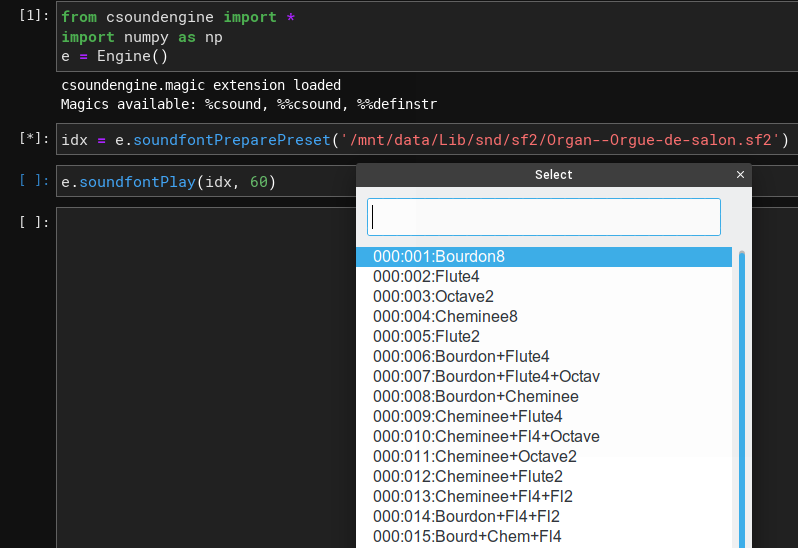
from csoundengine import *
e = Engine()

# Since the preset is not specified, this will launch a gui dialog
# to select a preset from a list of available presets
idx = e.soundfontPreparePreset('Orgue-de-salon.sf2')
event = e.soundfontPlay(idx, 60)

# Automate kpitch (p4) a major 3rd glissando from the current pitch,
offset, glissdur = 2, 8
e.automatep(event, 4, [offset, 60, offset+glissdur, 64])
See also
- soundfontPreparePreset(sf2path, preset=None)[source]#
Prepare a soundfont’s preset to be used
Assigns an index to a soundfont bank:preset to be used with sfplay or via
soundfontPlay()The soundfont is loaded if it was not loaded before
- Parameters:
sf2path (
str) – the path to a sf2 file – Use “?” to select a file interactivelypreset (
tuple[int,int] |None) – a tuple (bank, presetnum), where both bank and presetnum are ints in the range (0-127). None to select a preset interactively
- Return type:
int- Returns:
an index assigned to this preset, which can be used with sfplay/sfplay3 or with :meth:
~Engine.soundfontPlay
See also
- getUniqueInstrInstance(instr)[source]#
Returns a unique instance number (a float p1) for instr
- Parameters:
instr (int|str) – an already defined csound instrument
- Return type:
float- Returns:
a unique p1.
- playSample(tabnum, delay=0.0, chan=1, speed=1.0, gain=1.0, fade=0.0, starttime=0.0, lagtime=0.01, dur=-1.0)[source]#
Play a sample already loaded into a table.
Speed and gain can be modified via setp while playing
- Parameters:
tabnum (
int) – the table where the sample data was loadeddelay – when to start playback
chan – the first channel to send output to (channels start with 1)
speed – the playback speed
gain – a gain applied to this sample
fade – fadein/fadeout time in seconds
starttime – playback can be started from anywhere within the table
lagtime – a lag value for dynamic pfields (see below)
dur – the duration of playback. Use -1 to play until the end
- Return type:
float- Returns:
the instance number of the playing instrument.
Dynamic Fields
p4: gain
p5: speed
Example
>>> from csoundengine import *
>>> e = Engine()
>>> import sndfileio
>>> sample, sr = sndfileio.sndread("stereo.wav")
>>> # modify the samples in python
>>> sample *= 0.5
>>> table = e.makeTable(sample, sr=sr, block=True)
>>> eventid = e.playSample(table)
... # gain (p4) and speed (p5) can be modified while playing
>>> e.setp(eventid, 5, 0.5)   # Play at half speed
- playSoundFromDisk(path, delay=0.0, dur=-1, chan=1, speed=1.0, fade=0.01, gain=1.0)[source]#
Play a soundfile from disk via diskin2
- Parameters:
path (
str) – the path to the outputdelay – time offset to start playing
dur – duration of playback, use -1 to play until the end of the file
chan – first channel to output to
speed – playback speed (2.0 will sound an octave higher)
fade – fadein/out in seconds
- Return type:
float- Returns:
the instance number of the scheduled event
- Dynamic parameters
p5: kgain - Modifies the gain
p6: kspeed - Modifies the playback speed
See also
- setp(p1, *pairs, delay=0.0)[source]#
Modify a pfield of an active note
Multiple pfields can be modified simultaneously. It only makes sense to modify a pfield if a control-rate (k) variable was assigned to this pfield (see example)
- Parameters:
p1 (
int|float|str) – the p1 of the instrument to automate. A float or a “<name>.<instanceid>” will set the value for a specific instance, an int or a unqualified name will set the value of the given parameter for all instances*pairs – each pair consists of a pfield index and a value. The index is an int, matching the pfield number (4=p4, 5=p5, etc), the value can be a number (string values are not supported)
delay – when to start the automation
- Return type:
None
Example
>>> engine = Engine(...)
>>> engine.compile(r'''
... instr 100
...   kamp = p5
...   kfreq = p6
...   a0 oscili kamp, kfreq
...   outch 1, a0
... endin
... ''')
>>> p1 = engine.sched(100, args=[0.1, 440])
>>> engine.setp(p1, 5, 0.2, delay=0.5)
See also
- automateTable(tabnum, idx, pairs, mode='linear', delay=0.0, overtake=False)[source]#
Automate a table slot
- Parameters:
tabnum (
int) – the number of the table to modifyidx (
int) – the slot indexpairs (
Union[Sequence[float],ndarray]) – the automation data is given as a flat sequence of pairs (time, value). Times are relative to the start of the automation event.mode – one of ‘linear’, ‘cos’, ‘expon(xx)’, ‘smooth’. See the opcode interp1d for more information
delay – the time delay to start the automation.
overtake – if True, the first value of pairs is replaced with the current value in the param table of the running instance
- Return type:
float- Returns:
the eventid of the instance performing the automation
Example
>>> engine = Engine(...)
>>> engine.compile(r'''
... instr 100
...   itab = p4
...   kamp  table 0, itab
...   kfreq table 1, itab
...   outch 1, oscili:a(0.1, kfreq)
...   ftfree itab, 1  ; free the table when finished
... endin
... ''')
>>> source = engine.makeTable([0.1, 1000])
>>> eventid = engine.sched(100, 0, 10, args=(source,))
>>> # automate the frequency (slot 1)
>>> engine.automateTable(source, 1, [0, 1000, 3, 200, 5, 200])
>>> # Automate from the current value, will produce a fade-out
>>> engine.automateTable(source, 0, [0, -1, 2, 0], overtake=True, delay=5)
See also
- automatep(p1, pidx, pairs, mode='linear', delay=0.0, overtake=False)[source]#
Automate a pfield of a running event
The automation is done by another csound event, so it happens within the “csound” realm and thus is assured to stay in sync
- Parameters:
p1 (
float|str) – the fractional instr number of a running event, or an int number to modify all running instances of that instr. A named instr with an optional fractional part is also acceptedpidx (
int) – the pfield index. For example, if the pfield to modify if p4, pidx should be 4. Values of 1, 2, and 3 are not allowed.pairs (
Union[Sequence[float],ndarray]) – the automation data is given as a flat data. of pairs (time, value). Times are relative to the start of the automation eventmode – one of ‘linear’, ‘cos’, ‘expon(xx)’, ‘smooth’. See the csound opcode interp1d for more information (https://csound-plugins.github.io/csound-plugins/opcodes/interp1d.html)
delay – the time delay to start the automation.
overtake – if True, the first value of pairs is replaced with the current value in the running instance
- Return type:
float- Returns:
the p1 associated with the automation synth
Example
>>> e = Engine()
>>> e.compile(r'''
... instr 100
...   kfreq = p4
...   outch 1, oscili:a(0.1, kfreq)
... endin
... ''')
>>> eventid = e.sched(100, 0, 10, args=(1000,))
>>> e.automatep(eventid, 4, [0, 1000, 3, 200, 5, 200])
See also
- definedStrings()[source]#
Returns a dict mapping defined strings to their integer id
These are strings defined via
strSet()by the Engine, not internally using csound itselfWarning
Using strset within an instrument or as global code will probably result in conflicts with the strings defined via the Engine using
Engine.setStr()- Return type:
dict[str,int]- Returns:
a dict mapping defined strings to their corresponding index
- strGet(index)[source]#
Get a string previously set via strSet.
This method will not retrieve any string set internally via the strset opcode, only strings set via
strSet()- Return type:
str|None
Example
>>> e = Engine(...)
>>> idx = e.strSet("foo")
>>> e.strGet(idx)
foo
See also
strSet()
- freeTable(tableindex, delay=0.0)[source]#
Free the table with the given index
- Parameters:
tableindex (
int) – the index of the table to freedelay – when to free it (0=right now)
- Return type:
None
See also
- testAudio(dur=4.0, delay=0.0, period=1.0, mode='pink', gaindb=-6.0, echo=True)[source]#
Test this engine’s output
- Parameters:
dur – the duration of the test
delay – when to start the test
period – the duration of sound output on each channel
mode – the test mode, one of ‘pink’, ‘sine’
gaindb – the gain of the output, in dB
echo – if True, csound prints the channel to which it is outputting audio
- Return type:
float- Returns:
the p1 of the scheduled event
- udpSendOrc(code)[source]#
Send orchestra code via UDP.
The code string can be of any size (if the code is too long for a UDP package, it is split into multiple packages)
- Parameters:
code (str) – the code to send
- Return type:
None
See also
- udpSendScoreline(scoreline)[source]#
Send a score line to csound via udp
- Return type:
None
Example
>>> e = Engine(udpserver=True)
>>> e.compile(r'''
... instr 100
...   ifreq = p4
...   outch 1, oscili:a(0.1, ifreq)
... endin
... ''')
>>> e.udpSendScoreline("i 100 0 4 440")
See also
- udpSetChannel(channel, value)[source]#
Set a channel via UDP. The value will determine the kind of channel
- Parameters:
channel (
str) – the channel namevalue (
float|str) – the new value
- Return type:
None
See also
- writeBus(bus, value, delay=0.0)[source]#
Set the value of a control bus
Normally a control bus is set via another running instrument, but it is possible to set it directly from python. The first time a bus is set or queried there is short delay, all subsequent operations on the bus are very fast.
- Parameters:
bus (
int) – the bus token, as returned viaEngine.assignBus()value (
float) – the new valuedelay – if given, the modification is scheduled in the future
- Return type:
None
See also
Example
>>> e = Engine(...)
>>> e.compile(r'''
... instr 100
...   ifreqbus = p4
...   kfreq = busin:k(ifreqbus)
...   outch 1, vco2:a(0.1, kfreq)
... endin
... ''')
>>> freqbus = e.assignBus(value=1000)
>>> e.sched(100, 0, 4, args=[freqbus])
>>> e.writeBus(freqbus, 500, delay=0.5)
- automateBus(bus, pairs, mode='linear', delay=0.0, overtake=False)[source]#
Automate a control bus
The automation is performed within csound and is thus assured to stay in sync
- Parameters:
bus (
int) – the bus token as received viaEngine.assignBus()pairs (
Union[Sequence[float],tuple[Sequence[float],Sequence[float]]]) – the automation data as a flat sequence (t0, value0, t1, value1, …) or a tuple (times, values) Times are relative to the start of the automation eventmode – interpolation mode, one of ‘linear’, ‘expon(xx)’, ‘cos’, ‘smooth’. See the csound opcode ‘interp1d’ for mode information (https://csound-plugins.github.io/csound-plugins/opcodes/interp1d.html)
delay – when to start the automation
overtake – if True, the first value of pairs is replaced with the current value of the bus. The same effect can be achieved if the first value of the automation line is a nan
- Return type:
None
Example
>>> e = Engine()
>>> e.compile(r'''
... instr 100
...   ifreqbus = p4
...   kfreq = busin:k(ifreqbus)
...   outch 1, oscili:a(0.1, kfreq)
... endin
... ''')
>>> freqbus = e.assignBus(value=440)
>>> eventid = e.sched(100, args=(freqbus,))
>>> e.automateBus(freqbus, [0, float('nan'), 3, 200, 5, 200])
- readBus(bus, default=None)[source]#
Read the current value of a control bus
Buses can be used to allow communication between instruments, or between a running csound instrument and python. Buses are useful for continuous streams; when using buses to communicate discrete values with python an opcode like trighold might be necessary. In general for discrete events it might be better to use other communication means, like OSC, which provide buffering.
- Parameters:
bus (
int) – the bus number, as returned by assignBusdefault (
float|None) – the value returned if the bus does not exist
- Return type:
float|None- Returns:
the current value of the bus, or default if the bus does not exist
See also
Example
>>> e = Engine()
>>> e.compile(r'''
... instr 100
...   irmsbus = p4
...   asig inch 1
...   krms = rms:k(asig)
...   busout irmsbus, krms
... endin
... ''')
>>> rmsbus = e.assignBus(kind='control')
>>> event = e.sched(100, 0, args=[rmsbus])
>>> while True:
...     rmsvalue = e.readBus(rmsbus)
...     print(f"Rms value: {rmsvalue}")
...     time.sleep(0.1)
- releaseBus(bus, delay=None)[source]#
Release a persistent bus
- Parameters:
bus (
int) – the bus to release, as returned byassignBus()delay (
float|None) – when to release the bus (relative time). None means now
- Return type:
None
See also
- assignBus(kind='', value=None, persist=False)[source]#
Assign one audio/control bus, returns the bus number.
Audio buses are always mono.
- Parameters:
kind – the kind of bus, “audio” or “control”. If left unset and value is not given it defaults to an audio bus. Otherwise, if value is given a control bus is created. Explicitely asking for an audio bus and setting an initial value will raise an expection
value (
float|None) – for control buses it is possible to set an initial value for the bus. If a value is given the bus is created as a control bus. For audio buses this should be left as Nonepersist – if True the bus created is kept alive until the user calls
releaseBus(). Otherwise, the bus is reference counted and is released after the last user releases it.
- Return type:
int- Returns:
the bus token, can be passed to any instrument expecting a bus to be used with the built-in opcodes busin, busout, etc.
A bus created here can be used together with the built-in opcodes busout, busin and busmix. A bus can also be created directly in csound by calling busassign
A bus is reference counted and is collected when there are no more clients using it. At creation the bus is “parked”, waiting to be used by any client. As long as no clients use it, the bus stays in this state and is ready to be used. Multiple clients can use a bus and the bus is kept alive as long as there are clients using it or if the bus was created as persistent. When each client starts using the bus via any of the bus opcodes, like busin, the reference count of the bus is increased. After a client has finished using it the reference count is automatically decreased and if it reaches 0 the bus is collected.
Order of evaluation is important: audio buses are cleared at the end of each performance cycle and can only be used to communicate from a low priority to a high priority instrument.
For more information, see Bus Opcodes
Example
Pass audio from one instrument to another. The bus will be released after the events are finished.
>>> e = Engine(...)
>>> e.compile(r'''
... instr 100
...   ibus = p4
...   kfreq = 1000
...   asig vco2 0.1, kfreq
...   busout(ibus, asig)
... endin
... ''')
>>> e.compile(r'''
... instr 110
...   ibus = p4
...   asig = busin(ibus)
...   ; do something with asig
...   asig *= 0.5
...   outch 1, asig
... endin
... ''')
>>> bus = e.assignBus("audio")
>>> s1 = e.sched(100, 0, 4, (bus,))
>>> s2 = e.sched(110, 0, 4, (bus,))
Modulate one instr with another, at k-rate. NB: control buses act like global variables, the are not cleared at the end of each cycle.
>>> e = Engine(...)
>>> e.compile(r'''
... instr 130
...   ibus = p4
...   ; lfo between -0.5 and 0 at 6 Hz
...   kvibr = linlin(lfo:k(1, 6), -0.5, 0, -1, 1)
...   busout(ibus, kvibr)
... endin
...
... instr 140
...   itranspbus = p4
...   kpitch = p5
...   ktransp = busin:k(itranspbus, 0)
...   kpitch += ktransp
...   asig vco2 0.1, mtof(kpitch)
...   outch 1, asig
... endin
... ''')
>>> bus = e.assignBus()
>>> s1 = e.sched(140, 0, -1, (bus, 67))
>>> s2 = e.sched(130, 0, -1, (bus,))  # start moulation
>>> e.unsched(s2)        # remove modulation
>>> e.writeBus(bus, 0)   # reset value
>>> e.unschedAll()
See also
- busSystemStatus()[source]#
Get debugging nformation about the status of the bus system
This is only provided for debugging
- Return type:
dict- Returns:
a dict containing information about the status of the bus system (used buses, free buses, etc)
- eventUI(eventid, **pargs)[source]#
Modify pfields through an interactive user-interface
If run inside a jupyter notebook, this method will create embedded widgets to control the values of the dynamic pfields of an event
- Parameters:
eventid (
float) – p1 of the event to modify**pfields – a dict mapping pfield to a tuple (minvalue, maxvalue)
- Return type:
None
Example
from csoundengine import *
e = Engine()
e.compile(r'''
instr synth
  kmidinote = p4
  kampdb = p5
  kcutoff = p6
  kres = p7
  kfreq = mtof:k(kmidinote)
  asig = vco2:a(ampdb(kampdb), kfreq)
  asig = moogladder2(asig, kcutoff, kres)
  asig *= linsegr:a(0, 0.1, 1, 0.1, 0)
  outs asig, asig
endin
''')
ev = e.sched('synth', args=[67, -12, 3000, 0.9])
e.eventUI(ev, p4=(0, 127), p5=(-48, 0), kcutoff=(200, 5000), kres=(0.1, 1))
- csoundengine.engine.getEngine(name)[source]#
Get an already created engine by name
- Return type:
Engine|None
Example
>>> import csoundengine as ce
>>> ce.Engine(name='old', a4=435)
>>> getEngine('old')
Engine(name=old, sr=44100, backend=jack, outdev=dac, nchnls=2, indev=adc, nchnls_i=2,
       bufferSize=256)
>>> getEngine('foo') is None
True